Recently, scheduled maintenance on eTIMS and TIMS was carried out. For businesses across the country, this meant a temporary window during which invoices could not be transmitted directly to KRA.
Maintenance of this kind is a normal and necessary part of running national tax infrastructure. Systems that handle millions of invoices need periodic updates, security patches, and capacity work to stay reliable over the long term.
For DigiTax users, planning around it meant one thing: continuing to invoice as usual.
How the DigiTax Dashboard Handles It
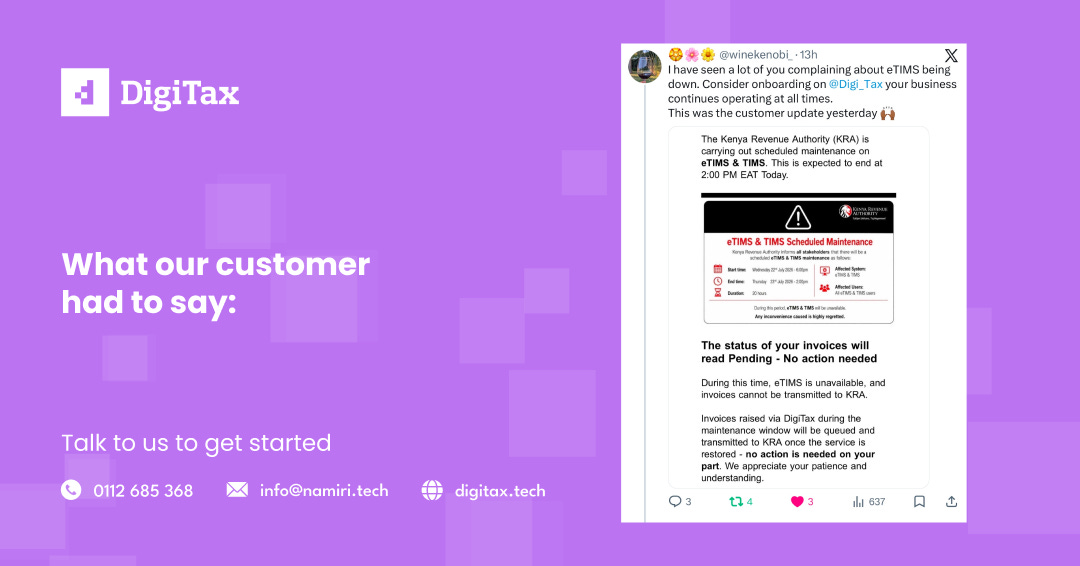
During the maintenance window, businesses on DigiTax could keep issuing eTIMS-compliant invoices from their dashboard without interruption. Once the eTIMS portal came back online, those invoices were automatically queued and transmitted to KRA — no resubmission, no manual tracking, no follow-up required from the user.
From where our customers sat, it was simple: sales continued, invoices were generated exactly as they always are, and compliance was handled in the background the moment KRA’s system was ready to receive them.
That’s the experience we’ve built DigiTax around — invoicing that keeps pace with your business, even when the underlying government infrastructure is temporarily unavailable for maintenance.
What This Looks Like in Practice
Picture a retail shop or manufacturing business mid-sale when a maintenance window opens. Without a system built to absorb that gap, the choice is often between pausing sales until the portal returns, or manually tracking which invoices still need to be filed once it does — both of which cost time and introduce room for error.
On DigiTax, that choice doesn’t need to be made. The invoice is issued at the point of sale as normal. It sits in a queue, fully formed and compliant, until the eTIMS portal signals it’s ready to receive data again. At that point, transmission happens automatically, in the order invoices were raised, with no intervention needed from the business.
Why This Matters Beyond One Maintenance Window
Maintenance windows are routine, but the underlying question they raise isn’t: how well is your invoicing set up to handle a period when the tax portal isn’t reachable? That question applies whether the downtime is scheduled maintenance, an unplanned outage, or simply a slow response time on a busy day.
A business that depends entirely on direct interaction with eTIMS inherits every pause in that system as a pause in its own operations.
The Takeaway
If you found yourself wondering how to handle invoicing during the maintenance window, that’s exactly the kind of moment DigiTax is designed for: your business keeps moving, and eTIMS compliance catches up automatically the moment the system is back.
See how DigiTax keeps your invoicing running, maintenance window: Request a Demo